

Your Google Business Profile (GBP) is one of the most valuable digital assets your business owns. It’s often the first thing potential customers see when they search for your business, making it a key driver of organic calls, website visits and foot traffic.
Because of its importance, it’s not uncommon to receive emails or notifications asking you to grant access to your profile. While some requests are completely legitimate, others deserve a much closer look before you click “Accept.”
Why Businesses Receive Access Requests
Many businesses work with marketing agencies, web developers, photographers or consultants who need access to help manage their online presence. Google makes this process simple by allowing profile owners to invite users with different permission levels.
The problem is that not every invitation comes from someone you’re actively working with.
Sometimes businesses receive unexpected requests from companies they’ve never spoken with, organizations they’re no longer partnered with or agencies attempting to establish a relationship. It’s easy to overlook these requests, especially if they arrive alongside legitimate Google notifications.
That’s why it’s important to verify every request before accepting it.
What Can Happen If the Wrong Person Gets Access?
Granting access to your GBP gives someone the ability to influence how your business appears online. Depending on the permission level they receive, they may be able to:
- Update your business information
- Change your business hours
- Edit your website link or phone number
- Respond to customer reviews
- Upload or remove photos
- Manage posts and business updates
- Add or remove other users
While Google provides safeguards, giving access to someone you don’t know or trust can create unnecessary complications and confusion down the road. Even small, unintended changes can impact customer trust, local search visibility and your overall online presence.
Best Practices for Protecting Your Profile
To help keep your GBP secure:
- Regularly review who has access to your profile.
- Remove users who no longer need access.
- Only accept invitations from people or companies you recognize and trust.
- Confirm unexpected requests before approving them.
- Use the lowest permission level necessary whenever possible.
- Enable two-factor authentication on your Google account for added security.
These simple habits can help prevent headaches while keeping your business information accurate.
Not Every Request Is Malicious, But…
Every request should be verified. Receiving an unexpected access request doesn’t automatically mean someone has bad intentions. It may come from a new employee at a company you already work with, an organization you’ve partnered with before or someone who simply sent the request by mistake.
When in doubt, don’t rush to click “Accept.” Instead, take a moment to work through this quick decision guide before granting access.
If you can’t confidently answer “yes” at every step, pause before granting access. Taking a few extra minutes to verify the request can help protect your business information, reputation and online visibility.
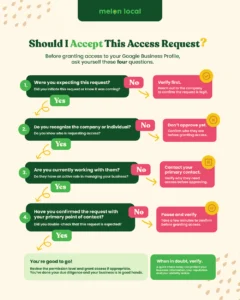
4 Questions to Ask Before Granting Access
It’s also a good idea to periodically review who currently has access to your Google Business Profile. Businesses often change vendors, employees leave organizations and partnerships evolve over time. Access that made sense a year ago may no longer be necessary today.
Four questions you should always ask when you receive an access request include:
- Were you expecting this request?
- Do you recognize the company or individual?
- Are you currently working with them?
- Have you confirmed the request with your primary point of contact?
A quick review can help ensure only the people actively managing your business have the permissions they need.
Trust Starts With Transparency
Your GBP plays an important role in helping customers find and choose your business. Protecting it doesn’t require technical expertise — just the habit of verifying who has access.
Before accepting your next invitation, take a few minutes to verify the request and review who already has access to your profile. It’s a simple step that can help protect one of your business’s most valuable marketing assets.
And if you’re looking for a trusted partner to help manage and optimize your GBP as part of a fully unified digital marketing strategy, schedule a free demo with Melon Local.